Are you a faculty or staff member with a DePaul-issued Windows computer?
Please check back on this web page for future announcements and dates.
Information Services has begun upgrading DePaul-owned, Windows computers to Windows 11, starting with newly issued computers in early 2025. This upgrade will continue through next year. Since Information Services has been asked to decrease its budget for the rest of 2025, replacement of some existing computers will need to be delayed. Upgrading work computers that are compatible with Windows 11 will continue.
How will I know if it’s time to upgrade my computer?
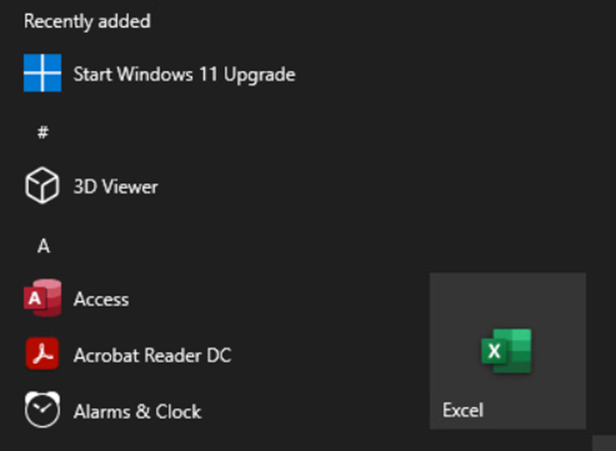
Either use the Windows search bar and type “Start Windows 11 Upgrade” to check if your computer can upgrade. If the computer can be upgraded, you will see the following icon:
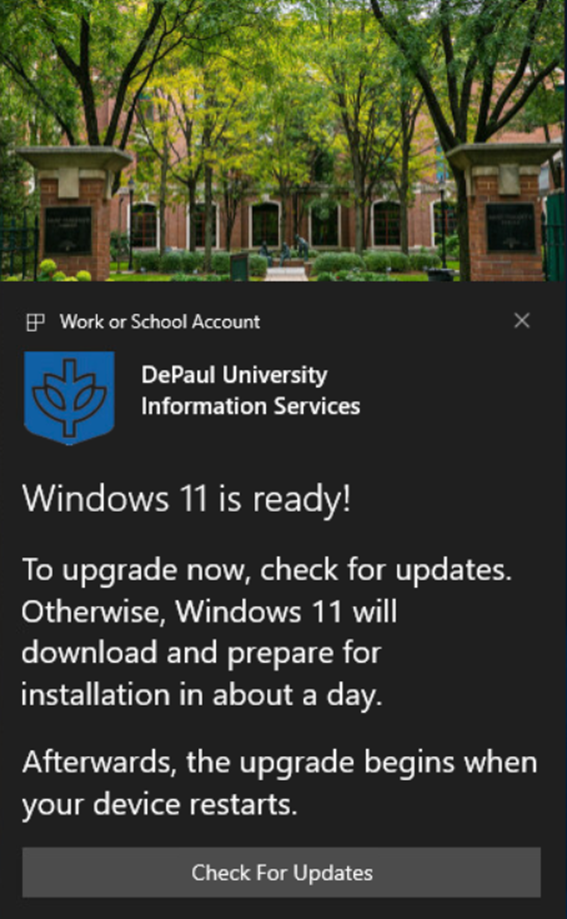
Or watch for this pop-up message:
New computers come with Windows 11
New DePaul-issued Windows computers are delivered with the Windows 11 operating system. Delivering new computers is the first step in upgrading all employee computers to Windows 11.
Employees currently using a Windows computer
DePaul employees currently using a Windows-based work computer with an older version will be upgraded. Depending on the device hardware, existing computers in the field will either be upgraded to Windows 11 or replaced at a later date. The process to upgrade existing work computers is expected to continue through 2026.
DePaul faculty and staff will see a pop-up message on their DePaul-issued Windows computers if your computer does not support Windows 11 and needs to be replaced. More upgrade details will come later as they become available.
Look for an email to your BlueM@il or a pop-up message on your DePaul computer and follow the instructions.
Testing Windows 11
For any DePaul faculty or staff members who are concerned about upgrading to Windows 11, they are encouraged to replace an older computer in their department with a new Windows 11 device. This device can be used to test the functionality of vital applications, programs, and systems within your area before the entire group upgrades to Windows 11. We encourage your department contact your vendor to acquire Windows 11 compatible hardware/software as needed.
Ordering new computers
Please talk to your supervisor or manager about the computer ordering process for your department.
Computer ordering process
-
Receive approval for a new computer from your manager, supervisor, or budget manager.
- Please review this
employee computer ordering page and submit computer order.
- You will receive a message from ServiceNow to your BlueM@il when the order has been approved.
- Look for
another notification from ServiceNow when your computer is ready for pickup. The message will include pickup location and hours of operation.
Learn more about the pickup and setup process for your new Windows 11 work computer at
go.depaul.edu/win11setup.
October 2025 Salvaging Event
E-Waste Drop-Off Event – October 13–17, 10:00 a.m. – 3:00 p.m. Salvage old computer and other hardware equipment.
DePaul’s Procurement Services team will host a Computer and Hardware E-Waste Drop-Off event on both Lincoln Park and Loop campuses. Salvage event locations:
- Loop Campus: Lewis 1405
- Lincoln Park Campus: College of Education LL105
What to recycle: Outdated or unused DePaul-issued desktops, laptops, monitors, keyboards, mobile devices, cables, and other technology hardware.
Vendor partner: PCs for People
- Provides secure data sanitization (DOD, HIPAA, NIST 800-88 compliant)
- Refurbishes and resells hardware at discounted rates for community benefit.
- Recycles or disposes of physical assets responsibly through eStewards- or R2-certified organizations Reach out to procurement@depaul.edu with any questions. Otherwise, bring your old hardware to the event!
Salvaging old computers
Salvaging my old computer and other hardware
If you see a pop-up notification on a Windows-based device that isn't your primary work computer, please make arrangements to properly salvage the device. Talk to your manager, supervisor, or budget manager to about hardware salvage. Either store the device in a secured location until the salvage event or contact your supervisor or budget manager about a designated secured storage location for your department, college, or office. Procurement holds salvage events in April and October and works with a vendor that repurposes DePaul computers and other hardware and accessories for discounted resale in the Chicago community. Devices are responsibly recycled and reused whenever possible. Reach out to
procurement@depaul.edu with any questions.
Once a new computer order is approved, DePaul employees are required to turn their old computers into Procurement Services. Old computers will no longer be functional, and it's important for data security to follow the proper salvage procedures. Please reach out to your office, school, or department's administrators or your manager. Most areas of the university have a budget manager or administrator that will have instructions for properly disposing of all computers.
Devices are disposed of by Procurement Services or authorized service providers in accordance with the
Salvage of University-Owned Equipment policy. Users are required to return the devices to Procurement Services or authorized service providers when they are no longer needed or eligible for use.
Devices are erased by Procurement Services or authorized service providers before disposal. Users are required to back up any personal or important data on the devices before returning them for salvage. Once you are ready to turn in your old computer, please review the salvage policy linked above.
Getting assistance
The Information Services team understands the organizational challenge this may present to DePaul employees and their schools, departments, or other areas. Information Services is here to assist you.
If you have questions about the Windows 11 upgrade, please reach out to the
Help Desk. Look for more information about the upgrade to Windows 11 in the coming months on this page (shortcut is
go.depaul.edu/windows11).
Labs and classrooms
University lab and classroom upgrades are planned for Fall 2025. Faculty, please update courseware and teaching material accordingly.